
How to Post to Multiple Facebook Groups More Efficiently in 2026
If you need to post to multiple Facebook groups consistently, the fastest approach is to use one source post, define a repeatable group list, and run scheduled posting windows instead of doing manual copy-paste all day. This reduces repetitive work, improves consistency, and makes it easier to post multiple times in a day when needed.
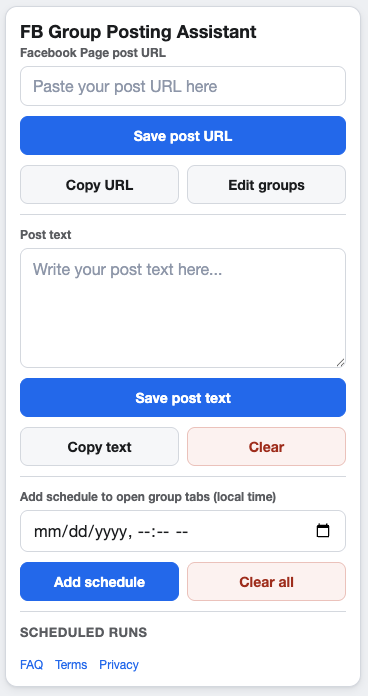
GetBuildMint helps streamline page-to-group posting and scheduling in Chrome.
Why manual posting breaks at scale
Manual group posting works when you have one or two groups. It becomes expensive when your routine includes 10, 20, or more groups. Every day, you repeat the same sequence: open each group, paste the same content, check format, and submit. That routine creates friction and mistakes.
Common issues include missed groups, uneven timing, accidental duplicate posts, and burnout from context switching. Most people underestimate how much time this takes over a week. Even if each post is fast, repetition compounds.
A better workflow for posting to multiple Facebook groups
1. Start from one source post
Create the core content as a Facebook Page post first. This gives you one stable URL to share across groups. It also keeps your message consistent and easy to update.
2. Keep a clean group list
Maintain a vetted list of groups where you are allowed to post. Remove low-performing or irrelevant groups regularly. Clean lists make automation safer and easier to manage.
3. Use scheduling windows
Instead of posting all at once, run specific schedule blocks during the day. For example, one morning slot and one afternoon slot. This helps when you need to post to Facebook groups multiple times a day without being online every hour.
4. Review outcomes weekly
Track which groups engage and which do not. Better group selection often produces better results than simply increasing posting volume.
Scheduling benefits in practical terms
- Less repetitive manual work and fewer missed posts.
- Consistent publishing rhythm without babysitting every run.
- Better control when posting multiple times per day.
- More time for message quality, offer testing, and response handling.
A browser-based Facebook group posting tool can support this process because it keeps your workflow close to where you already work: in Chrome, with your own selected groups.
Who this is for
This approach is useful for marketers, agencies, small businesses, and affiliate operators who need dependable group posting without managing a heavy external platform. If your priority is speed plus consistency, workflow discipline matters more than complexity.
FAQ
Can I post to multiple Facebook groups more than once per day?
Yes. Use schedule windows and control frequency based on group rules and relevance.
Is a Facebook group scheduler better than manual posting?
For recurring campaigns, yes. It reduces repetitive steps and helps maintain consistency.
What should I avoid?
Avoid spam-like frequency and posting to groups where your content is not relevant.
Try GetBuildMint for a simpler posting workflow
Share one Facebook Page post to multiple groups, schedule runs, and reduce repetitive manual work in Chrome.