
Why Use a Chrome Extension for Facebook Group Posting?
A Chrome extension can be a practical fit when you want to keep Facebook group posting close to your normal browser workflow. Instead of managing a heavy dashboard, you can save campaign details, select groups, and run scheduled posting steps from Chrome.
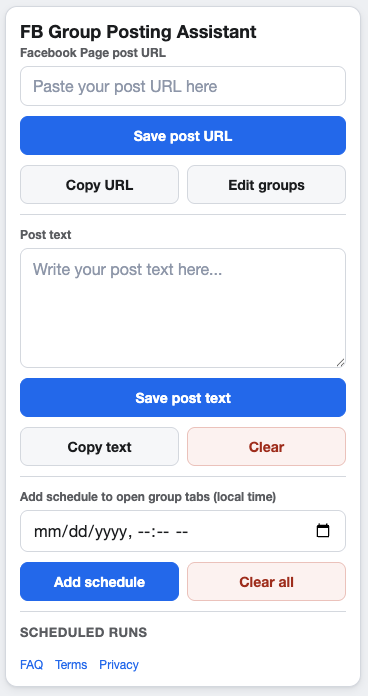
A browser-first workflow keeps posting setup closer to where the work happens.
When a Chrome extension makes sense
Many small businesses and marketers do not need a large social media command center for one repeatable task. They need a faster way to share Facebook Page posts to selected groups, set schedules, and reduce repeated tab switching.
A Chrome extension fits that use case because it works inside the browser environment where the posting flow already happens.
Benefits of a browser-based workflow
Lower setup overhead
A focused extension can be easier to install, understand, and reuse than a broad platform with many unrelated features.
Saved campaign context
Campaigns can keep the Page post URL, supporting text, group selections, and schedule windows together.
Practical control
Because the workflow stays in Chrome, it can feel more transparent than sending everything through a complex external dashboard.
What to look for
- Clear group list management.
- Multiple daily schedule support when needed.
- Simple Page post URL sharing workflow.
- Pacing controls that help avoid rushed repetitive posting.
FAQ
Is a Chrome extension enough for group posting?
For focused page-to-group workflows, yes. It is especially useful when you want a lightweight setup.
Who should use a heavier platform?
Teams that need broad cross-channel publishing, approvals, analytics suites, and many user roles may need a larger system.
Try a focused Chrome workflow for group posting
GetBuildMint helps you share Facebook Page posts to multiple groups, manage schedules, and reduce repetitive browser work.